

Flickering is one of the most common issues with LED strips. By reading this article, you will learn about the types of flickering, the causes behind it, and how to fix it. Let’s dive in!
Thank you for reading this post, don't forget to subscribe!

 dimmers & accessories
What Are the Different Types of Flickering?
Flickering refers to the rapid on/off cycling of a light source. While it can be intentional (e.g., in nightclubs or concerts), it is often an unwanted issue.
There are two main types of flickering:
1. Visible Flicker: This occurs at a frequency below 100 Hz (100 cycles per second or less) and can be seen by the human eye.
2. Invisible Flicker: This occurs at a frequency above 100 Hz and is not visible to the naked eye, but it can still have negative effects.
Both types of flickering can cause health issues such as eye strain, headaches, migraines, dizziness, and even cognitive impairment. Visible flickering can also trigger seizures in individuals with epilepsy.
What Are the Causes of LED Strip Light Flickering?
Here are the most common causes of LED strip flickering:
- Visible Flicker Causes
1. Poor Connections
Flickering often starts or worsens due to loose or inconsistent connections. Poor connections can intermittently break the circuit, causing the LED strip to flicker. This is common in solderless connectors but rare in soldered connections.
2. Incompatible Components
Using incompatible parts, such as mismatched power supplies or controllers, can lead to flickering. For example, a power supply with insufficient voltage or current output may not properly support the LED strip.

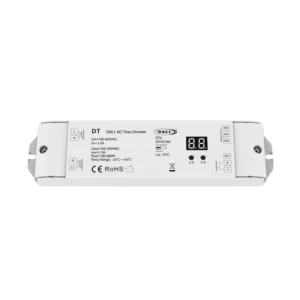 triac does not work with pwm
3. Overloaded or Faulty Power Supply
An overloaded or defective power supply can cause flickering by failing to deliver consistent power to the LED strip. This is especially common when the power supply is undersized for the load. We have written more about choosing an LED driverin our article: Choose the right power supply for your LED strip.
4. Transformer in Pairing Mode for Wireless Control
If a Zigbee-compatible driver flickers upon initial power-up, it’s likely entering pairing mode to connect with a wireless controller or hub. This mode typically lasts 3 minutes; if no connection is established, the lights stabilize. For detailed steps, refer to guides like Zigbee Lighting Control Part 5.
5. Faulty LED Strip Identification
Flashing often stems from physical damage (e.g., sharp bends, solder-joint stress) or poor chip/holder connections. To pinpoint the issue:
- Test: Press the flickering area—changes in behavior confirm the fault location.
- Cause: Intermittent gold wire contact disrupts power flow.
- Solution: Replace the damaged segment or re-solder weak joints.

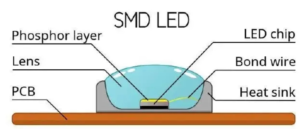 smd led strip structure. if the joint breaks the led strip may flash
Preventive Tip: Avoid over-flexing strips and secure connections with heat-shrink tubing.
- Invisible Flicker Causes
1. AC Power LED Strip
Some LED strips are designed to run on AC power, which can cause high-frequency flickering that is invisible to the eye but still harmful.
2. PWM Dimming
Pulse Width Modulation (PWM) dimming is a common method for controlling LED brightness. However, if the PWM frequency is too low, it can cause invisible flickering that may still affect your health.
—
How to fix LED Strip Lights from Flickering?
Here are some solutions to fix flickering issues:
- Visible Flicker Solutions
1. Inspect the Connection
Check all connections, including solderless connectors, and ensure they are secure. Re-solder any loose connections if necessary.
2. Replace Incompatible Components
Ensure all components, such as power supplies and controllers, are compatible with your LED strip. Use a power supply with the correct voltage and current rating.
3. Replace the LED Driver
If the power supply is overloaded or defective, replace it with a high-quality LED driver that matches the specifications of your LED strip.
4. Replace Faulty LED Strips
If the LED strip itself is defective, replace it with a new one. Inspect the strip for physical damage or manufacturing defects before installation.
- Invisible Flicker Solutions
1. Use Low Voltage DC LED Strip Lights with LED Drivers
Low-voltage DC LED strips paired with high-quality LED drivers are less likely to cause flickering compared to AC-powered strips.
2. Use Dimming Power Supplies with CCR Output Signal
Constant Current Reduction (CCR) dimming is a flicker-free alternative to PWM dimming. Use a dimming power supply with CCR output for smoother dimming.
3. Use Dimming Power Supplies with High-Frequency PWM Output Signal
If PWM dimming is necessary, ensure the power supply uses a high-frequency PWM signal (above 1 kHz) to minimize invisible flickering.
—
Conclusion
Flickering in LED strips can be caused by a variety of factors, including poor connections, incompatible components, faulty power supplies, or defective strips. By identifying the type of flickering (visible or invisible) and addressing the root cause, you can effectively eliminate the issue and enjoy a stable, flicker-free lighting experience.
—
Related Posts
– How to Choose the Right Power Supply for Your LED Strip
– Top 5 Common LED Strip Problems and How to Fix Them
– Understanding PWM vs. CCR Dimming for LED Strips
By following the tips and solutions outlined in this article, you can ensure your LED strips provide consistent, high-quality lighting without the annoyance of flickering.


