

In the world of modern LED lighting, an LED controller is an essential component for getting the most out of your lights. Whether you’re installing single-color strips, RGB or RGBW setups, or advanced pixel addressable lights, the right controller determines how your lights look, respond, and perform.
Thank you for reading this post, don't forget to subscribe!This comprehensive guide explains what an LED controller is, how it works, the different types, and how to choose the best one for your project.
What Is an LED Controller?
An LED controller is a device that sends signals to your LED lights, telling them how to behave. It controls functions like turning lights on and off, adjusting brightness, changing colors, creating effects, or syncing with music.
Without a controller, your LED strip lights would simply stay at full brightness and single color (if possible). The controller gives you the power to customize your lighting experience.

How Does an LED Controller Work?
LED controllers work by:
- Receiving input from you— through a remote, wall panel, smartphone app, or automation system.
- Processing the signal — using built-in software and microchips.
- Sending output — voltage and data signals that instruct the LEDs to dim, change color, run chase effects, or respond in patterns.
Key Functions of LED Controllers
- On/Off Control: Basic switching of LED lights.
- Dimming: Smooth adjustment of brightness.
- Programming: Creating and saving preset lighting scenes and effects.
- Scheduling: Automating on/off times or lighting changes.
- Zoning/Grouping: Controlling separate groups of lights independently.
- Effects: Adding dynamic effects like fading, strobing, and chasing.
- Color Control: Adjusting multiple color channels to produce custom colors.
- Wireless Connectivity: Control via WiFi, Bluetooth, RF, etc.
- App and Voice Control: Managing lights through smartphones, tablets, or voice assistants.
Types of LED Controllers
✅ 1. Single-Color Dimmers
For simple white or single-color strips. A dimmer allow you adjust brightness and turn lights on or off.
Common examples:
- Inline dimmer switches
- Wall-mounted rotary dimmers
- Remote-controlled dimmers

✅ 2. RGB and RGBW Controllers
For color-changing strips. RGB controllers mix red, green, and blue light to create millions of colors. RGBW adds a dedicated white LED for true white tones.
Common features:
- Color selection via remote or app
- Pre-programmed modes (fade, strobe, jump)
- Speed and brightness adjustment
- Group control for multiple zones

✅ 3. Pixel or Addressable LED Controllers
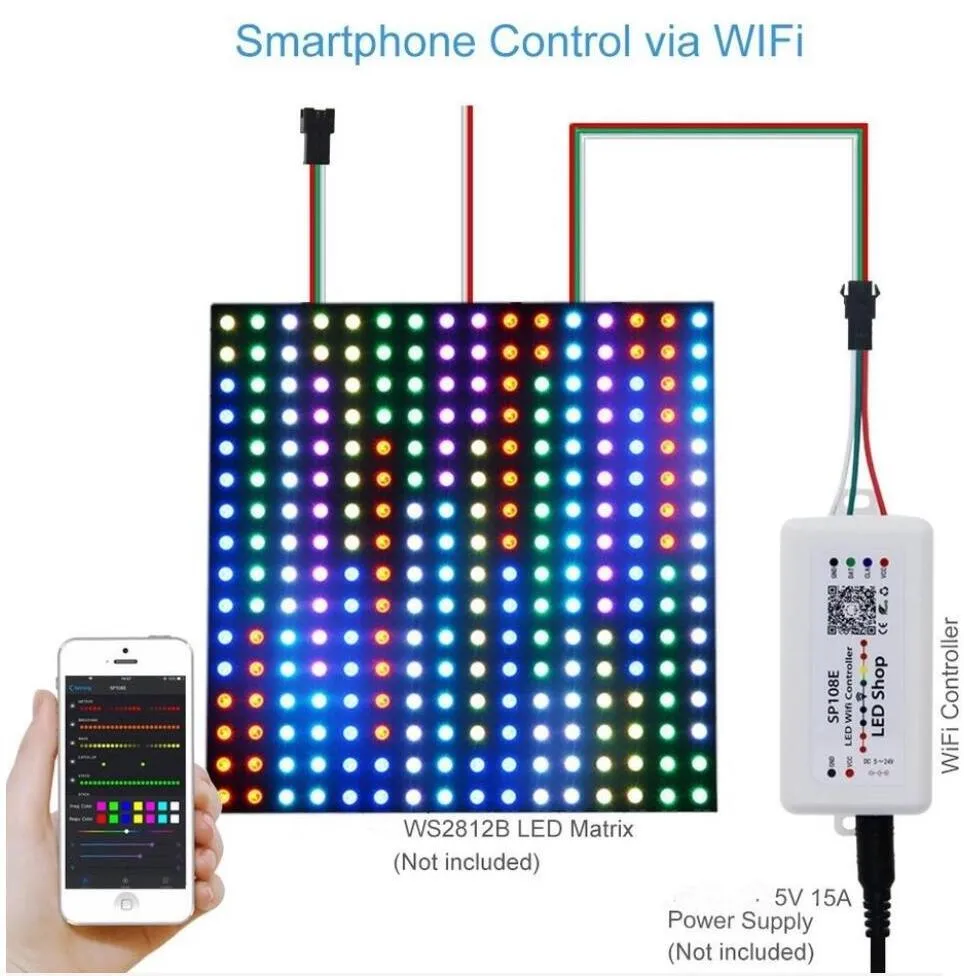
For individually addressable LEDs (like WS2812, SK6812, UCS2904, WS2815, GS8208 etc.). These controllers can create stunning chasing, rainbow, or video effects.
Used for:
- Advanced architectural facades
- Stage designs and events
- Custom signs with animations
- Large-scale LED displays

✅ 4. DMX Controllers
DMX (Digital Multiplex) is a professional lighting control protocol. DMX controllers are used for large lighting installations like stages, nightclubs, building facades, or synchronized shows.
Key features:
- Precise control of hundreds or thousands of LEDs
- Integration with other DMX equipment
- Scene programming and show playback

✅ 5. Smart and Wi-Fi Controllers
Modern LED controllers often have Wi-Fi or Bluetooth, allowing you to control your lights with your phone, smart speaker, or home automation system.
Popular options:
- Alexa or Google Home compatibility
- Smartphone apps with scheduling
- Voice control
- Cloud syncing for remote access
| Type | Description | Typical Use Cases |
| Single-Color Controllers | Control single-color LED strips with on/off and dimming functions. | Basic lighting setups |
| Multi-Color (RGB/RGBWW) Controllers | Control multiple color channels (red, green, blue, white) for color mixing and effects. | Color-changing LED strips and bulbs |
| Triac/DALI/0-10V Controllers | Designed for dimming LED drivers and integration with wall dimmers and building systems. | Commercial and architectural lighting |
| SPI Controllers | Control individually addressable LED modules for pixel-level effects and animations. | Advanced decorative and stage lighting |
| RF Wireless Dimmable Drivers | Remote dimming via RF signals. | Simple wireless control |
| DMX Controllers | Use DMX512 protocol for professional stage and event lighting control. | Theaters, concerts, events |
| WiFi/Bluetooth Controllers | Wireless control via smartphones, tablets, and smart home integration. | Smart homes and flexible lighting control |
| Zigbee Controllers | Mesh network wireless control for large-scale commercial lighting systems. | Large commercial and architectural projects |
| KNX Controllers | Building automation standard integrating lighting with HVAC, security, etc. | Integrated building automation environments |
How to Choose the Right LED Controller
When selecting a controller, consider:
- Type of LEDs: Are they single color, RGB, RGBW, or pixel?
- Voltage: Match your controller to your LED strip voltage (12V or 24V).
- Power Capacity: Check that the controller can handle the total wattage.
- Control Method: Do you want a remote, wall panel, smartphone app, or DMX?
- Special Features: Do you need music sync, scheduling, or multi-zone control?
Applications of LED Controllers
- Residential: Customizable ambiance with color and brightness control.
- Commercial: Dynamic lighting for retail, offices, restaurants, and hotels to enhance atmosphere and productivity.
- Architectural: Accent and facade lighting with precise color and intensity control.
- Entertainment: Stage, concert, and event lighting with complex effects and synchronization.
- Outdoor and Landscape: Energy-efficient, programmable lighting for gardens, parks, and public spaces.

Installation and Best Practices
- Always turn off the power before wiring.
- Use the correct controller type for your LED strip (e.g., RGB, RGBW, RGB+CCT).
- Match the power supply voltage and amperage with the LED and controller requirements.
- Strip wires properly and secure connections with electrical tape or terminal blocks.
- Ensure adequate ventilation to prevent overheating.
- Use shielded cables to reduce interference, especially for large or addressable LED systems.
- Test all functions after installation to confirm proper operation.

Advanced Features
Modern LED controllers may include:
- Music synchronization for lights reacting to sound.
- Integration with smart home platforms (Amazon Alexa, Google Assistant).
- Automated lighting scenes and effects based on time or events.
- Precise color temperature control for tunable white or dim-to-warm LEDs
FAQs About LED Controllers
Conclusion
The right LED controller unlocks the true potential of your LED lighting. From a simple dimmer for a cozy room to a powerful pixel controller for a building facade, there’s a solution for every project.
Need help finding the perfect controller?
Contact us today — our team will help you choose the best LED controller for your needs!


